Best Wired Headphones for Podcasters: OneOdio Pro-10 Wins

Five wired over-ear picks compared on drivers, weight, cable and warranty, with a clear winner for solo hosts and a runner-up for multi-guest sessions.

By Frederick CameronUpdated 15 min read
On this page
- Best wired headphones for podcasters at a glance
- What most podcast headphone guides get wrong
- How I screened these five listings
- 1. OneOdio Pro-10 — Best overall
- 2. Philips SHP2000 — Best upgrade
- 3. Audio-Technica ATH-M20x — Best premium
- 4. OneOdio A71 — Best minimal setup
- 5. Botesty Wired Headphones — Best budget pick
- Wired vs wireless for podcast recording?
- What the plug on the end of the cable tells you
- Does the modifier hold up here?
- Which pick fits which recording setup?
- The verdict
- FAQ
The best wired headphones for podcasters are the OneOdio Pro-10, a 0.66 lb closed-back set with 50mm drivers, a 2-year warranty and a share port that lets a co-host plug straight in. The Audio-Technica ATH-M20x is the better buy if you edit for hours and want the tightest published isolation of the five. Below, each pick is tied to a specific recording setup.
Best wired headphones for podcasters at a glance
| Pick | Drivers | Cable & plug | Price |
|---|---|---|---|
Best overall OneOdio Pro-10 |
50mm with neodymium magnets | Detachable, share port | Check Price |
Best upgrade Philips SHP2000 |
40mm | 2 m cable, 6.3 mm adapter included | Check Price |
Best premium Audio-Technica ATH-M20x |
40mm, copper-clad aluminium coils | Single-side cable exit | Check Price |
Best minimal setup OneOdio A71 |
40mm | 6.6–9.8 ft coiled, 6.35 mm + 3.5 mm | Check Price |
Best budget pick Botesty Wired |
Not listed | 4.9 ft nylon-braided, 3.5 mm only | Check Price |




What most podcast headphone guides get wrong
Most guides comparing headphones for podcasting start with driver size. That is the wrong end of the problem. A 40mm driver and a 50mm driver both produce clear speech in a closed-back cup, and no listing here quotes a frequency response you could use to separate them.
The specification that actually decides this category is the plug on the end of the cable. Podcast interfaces and mixers use a quarter-inch (6.35 mm) headphone jack. Laptops, phones and USB audio dongles use a 3.5 mm jack. Two of the five picks here ship with both plugs in the box. Two ship with 3.5 mm only. One lists a 2 m cable with a 6.3 mm adapter included.
The second specification worth caring about is weight, because a podcast session is longer than a music listening session. Four of the five picks publish a weight: 0.55 lb, 0.55 lb, 7.41 oz (0.46 lb) and 0.66 lb. The A71 is heaviest at 0.83 lb. Those differences sound trivial written down, and they are not trivial on your head at the ninety-minute mark.
Everything else, including driver diameter and the marketing around "studio monitoring", is secondary. Get the plug right and the weight tolerable, and any of these five will let you hear a plosive or a chair creak the moment it lands on the timeline.
How I screened these five listings
I lined up wired over-ear listings that mention podcast, studio or monitor use, then cut anything without a published weight and anything without a stated cable arrangement. Three reasons dominated the disqualifications:
- Listings that only quote "clear sound" with no driver size or weight. You cannot compare those to anything.
- Listings without a warranty statement. Three of the five picks below publish one; the other two do not, and I have called that out.
- Listings that lock the buyer into a single plug format with no adapter. One of the five here has that limitation, and it is the reason it lands where it lands.
The five picks that survived cover the full price range in the set, from the cheapest to the most expensive, so the reader has a real ladder rather than five variants of the same shape.
1. OneOdio Pro-10 — Best overall
The Pro-10 is the only pick in this set that pairs 50mm drivers, a published 2-year warranty, and a share port for a second listener.
Best for: solo hosts who mix their own episodes on a laptop Skip it if: you record standing up and pace around the room
Within this set, the Pro-10 is the only pick with 50mm drivers; the other four run 40mm or do not publish a size. OneOdio also states neodymium magnets, which the others in the group do not, and the listing quotes a 0.66 lb weight and a 3.94 x 7.09 x 5.51 in folded size. The 2-year warranty is matched only by the ATH-M20x, and the Pro-10 sits at the mid price position while the M20x sits at the top.
The share audio port is the one feature that actually maps to podcast work. If a guest sits next to you and wants to hear the playback while you review a take, the Pro-10 lets a second pair plug into the cup without a splitter, which OneOdio says works with no special cable. The 90° swivelling cups allow the single-ear monitoring style DJs use, and podcast hosts use it the same way: one ear on the guest, one ear on the mix.
The trade-off against the ATH-M20x is build: OneOdio calls the Pro-10 comfortable and the cushions padded, without the "advanced build quality" and single-side cable exit that Audio-Technica specifies. In this set that costs it the top of the ladder, not the top of the ranking.
Pros:
- 50mm drivers, the largest published in the set
- 2-year warranty, matched only by the premium pick
- Share port for a second listener at the desk
- 0.66 lb, comfortable middle weight of the group
- Mid price position for the largest driver here
Cons:
- Cable length not published on the listing
- Bulkier at 5.51 in wide than the Philips or Botesty
- OneOdio does not publish a driver impedance figure
2. Philips SHP2000 — Best upgrade
The lightest published weight in the set, with a 6.3 mm adapter in the box for interface work.
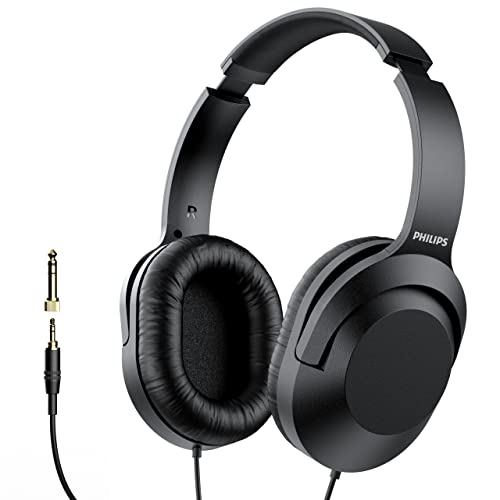
Best for: hosts who want the lightest headband for two-hour sessions Skip it if: you need a coiled cable or a quarter-inch plug in the box
The Philips p2000 is the second-cheapest here and, at 0.55 lb, tied for the lightest published weight in the group. Philips quotes 40mm drivers and a 2 m fixed cable, and the listing states a 6.3 mm (1/4 in) add-on adapter is included, which is the piece that lets these plug straight into a mixer or audio interface without a separate accessory purchase. The listing also mentions 90-degree rotating earcups, so the single-ear monitoring pose is available if you need to talk to a guest in the room.
Two things temper the pick. The warranty is listed only as "Manufacturer's Warranty" with no duration stated, so a buyer who wants a fixed term should look at the Pro-10 or the M20x. And the cable is straight, not coiled, which is not automatically a fault, but it does mean the whole 2 m sits on the desk between you and the interface. If you record seated, that is fine; if you get up to grab water, expect to unplug.
Against the Pro-10, the Philips wins on head weight and on adapter clarity, and gives up the share port and the specified warranty duration.
Pros:
- 0.55 lb, tied for lightest in the group
- 6.3 mm adapter included in the box
- 2 m cable stated on the listing
- 40mm drivers with a rotating cup for monitoring
- Second-cheapest of the five
Cons:
- Warranty duration not stated
- No coiled cable option
- No share port for a second listener
3. Audio-Technica ATH-M20x — Best premium
The best-published build and isolation story in the set, at the highest price position.

Best for: editors who care about isolation and long-term build Skip it if: you want a coiled cable or a share port for a co-host
The ATH-M20x is the most expensive pick here and the lightest by a small margin, at 7.41 oz. It is also the oldest listing in the group, released in 2014, which in headphones means the design has had a decade of buyers wringing it out. Audio-Technica publishes more construction detail than any other listing here: 40mm drivers with rare-earth magnets and copper-clad aluminium voice coils, a circumaural design that contours around the ears for sound isolation "in loud environments", and a single-side cable exit that keeps the wire off your mouse hand.
For a podcaster the isolation claim is the most useful piece. Closed-back headphones matter when you are recording live, because any sound leaking from your cup will bleed into a nearby microphone and colour the take. Audio-Technica is the only listing in the set that names the isolation approach and the enclosure style in the same sentence.
What the M20x does not do is share. There is no second port on the cup and no mention of a share cable in the box. It also ships with a single cable exit, not a coiled cord, and the warranty of 2 years on parts and labour matches the Pro-10 rather than exceeding it. If you record with a guest at the same desk, the Pro-10 is a better fit for the money.
Pros:
- Circumaural design named for isolation in loud rooms
- 2-year parts-and-labour warranty
- 7.41 oz, the lightest weight published here
- Single-side cable exit, less snag on the desk
- Copper-clad aluminium voice coils specified
Cons:
- Highest price position in the set
- No share port for a co-host
- No coiled cable listed
4. OneOdio A71 — Best minimal setup
The only pick that ships a coiled cord long enough to walk to the interface with, and both plug sizes in the box.

Best for: hosts plugging straight into a mixer or audio interface Skip it if: weight on the head bothers you after an hour
The A71 is built around the connection problem. OneOdio states a 6.6 to 9.8 ft coiled cord with a 6.35 mm plug on one end and a 3.5 mm plug also included, meaning the same headphones work on a mixer, an audio interface, a laptop and a phone with nothing extra to buy. That is the reason to pick these: a minimal setup that does not need a bag of adapters. The share audio port is there too, as on the Pro-10, so a guest can plug into your cup.
The published drivers are 40mm, smaller than the Pro-10's 50mm, and the weight is 0.83 lb, the heaviest in the set. That extra weight is where the coiled cable and the twin plug system come from, and it is not trivial: at nearly a fifth of a pound heavier than the Philips, you will feel it on a long recording. OneOdio does not publish a warranty duration on this listing, which is the second thing that keeps it out of the top spots.
Against the Pro-10 the A71 wins on cable and plug flexibility and loses on driver size, weight and warranty clarity. Against the Philips it wins on the coil and the twin plug and gives up the light headband.
Pros:
- Coiled 6.6–9.8 ft cord stated on the listing
- Both 6.35 mm and 3.5 mm plugs in the box
- Share audio port for a second listener
- 40mm drivers with 90° swivelling cups
Cons:
- 0.83 lb, heaviest in the group
- No warranty duration published
- Bulkier folded footprint than the Pro-10
5. Botesty Wired Headphones — Best budget pick
The cheapest pick in the set, with a 3.5 mm plug and a nylon-braided cable, for a guest chair that does not need a big rig.

Best for: a second pair for a guest chair on a tight budget Skip it if: you need a quarter-inch plug for your interface
The Botesty is the cheapest of the six and the one buyers choose most often in this set. Botesty states 0.55 lb, a 4.9 ft nylon-braided cord, an inline microphone, an adjustable headband and 90° rotating ear cups, and a 6-month warranty. That warranty length is the shortest in the group; every other pick that publishes a duration publishes 2 years.
Two things about this listing matter to a podcaster. First, the plug is 3.5 mm only, and the product page notes explicitly there is no 6.35 mm adapter and no volume control on the cup. If your interface uses a quarter-inch headphone output, these do not fit without a separate adapter you have to source. Second, Botesty does not publish a driver size at all, so there is no comparable specification against the other four picks here. What you are buying is a light, cheap, wired closed-back set for a use case that does not stress it.
That use case exists. Guest chairs need cheap, replaceable headphones that plug into a laptop with no fuss. A remote guest who dials in over a USB microphone often plugs their monitoring headphones into the same laptop. For that job, and only that job, the Botesty is the right shape.
Pros:
- Cheapest pick in the set
- 4.9 ft nylon-braided cord
- Inline microphone stated
- 0.55 lb, tied for lightest weight
Cons:
- No driver size published
- 3.5 mm plug only, no adapter listed
- 6-month warranty, shortest in the group
- No volume control on the cup
Wired vs wireless for podcast recording?
Wired vs wireless is the first question a new podcast host asks, and the answer for recording is not close. Wireless headphones add latency between what the microphone captures and what your ears hear, and even a small delay makes speaking feel wrong. They also add a battery you have to remember to charge before a session. Every pick in this roundup is wired, which is the correct choice for tracking and for editing on the same machine.
- Latency: a wire has none you can measure at these lengths
- Battery: a wire has none to run out mid-take
- Interference: no wireless signal to compete with a Wi-Fi router or a phone
- Repair: a broken cable is often replaceable, a broken radio is not
Wireless is fine for listening back to a finished episode on the sofa. It is not fine for recording one.
What the plug on the end of the cable tells you
Read the plug spec before anything else. Podcast recording rigs fall into three shapes, and each shape wants a different cable:
- Laptop or phone only. A 3.5 mm plug is enough. The Philips, the Botesty and the two OneOdio picks all offer this.
- USB audio interface, small mixer or portable recorder. Most of these expect a 6.35 mm (quarter-inch) plug. The A71 ships both plugs; the Philips ships a 3.5 mm cable with a 6.3 mm adapter; the Pro-10 uses a detachable cable arrangement OneOdio describes without stating the box contents in the specs table.
- Full desk mixer with balanced monitoring. The same 6.35 mm plug applies, and the coiled cord on the A71 is the shape that suits a seated position at a mixer.
If the listing does not say what plug is in the box, treat it as a 3.5 mm plug and budget for an adapter. That is the honest reading of every silent listing here.
Does the modifier hold up here?
Only the Philips listing explicitly names podcasts in its title. The other four are sold as DJ, monitoring or general over-ear headphones. None of these is a "podcaster" specification in the way a microphone can carry a broadcast rating; the shape you want is a closed-back wired over-ear set with a plug that matches your interface. All five picks are closed-back wired over-ear sets, and the plug question is covered above. Judge each listing on the specs that matter for recording, not on whether the word podcast appears in the product name.
Which pick fits which recording setup?
- Solo host, laptop, no guest in the room: Philips SHP2000 or OneOdio Pro-10. The Philips is lighter; the Pro-10 has the bigger drivers and the longer warranty.
- Solo host, USB interface, wants one set that just works: OneOdio A71. Both plugs in the box, coiled cord.
- Two hosts at the same desk: OneOdio Pro-10. The share port is the reason.
- Editor who spends hours on the timeline: Audio-Technica ATH-M20x. Lightest weight, best-published isolation.
- Second pair for a guest chair: Botesty. Cheap, light, 3.5 mm, done.
The verdict
The best wired headphones for podcasters in this set are the OneOdio Pro-10. It is the only pick that combines the largest drivers here (50mm), a published 2-year warranty, and a share port that lets a second person plug into your cup without a splitter. At the mid price position, it undercuts the Audio-Technica ATH-M20x while matching its warranty length, and it beats every other pick on published driver size.
Two conditions flip the recommendation. If you spend more time editing than recording, and isolation while you work matters more than sharing playback with a guest, the ATH-M20x is the better buy: it is the lightest published weight in the group and Audio-Technica names the isolation approach and voice-coil construction in a way no other listing does. If you plug into a mixer or audio interface and want one set that arrives ready with both plug sizes and a coiled cord, the OneOdio A71 is the pick, with the weight penalty as the price.
The Philips SHP2000 remains the value option under the Pro-10, and the Botesty is a genuine guest-chair buy rather than a main pair. Start with the Pro-10 unless one of those conditions applies.
FAQ
Are wired headphones for podcasters worth it over wireless?
Wired headphones for podcasters are worth it because a cable adds no latency between the microphone and your ears, needs no battery, and cannot drop a wireless signal mid-take. Every pick in this guide is wired for exactly that reason. Wireless is fine for playback on the sofa; it is the wrong shape for recording or editing, where a small delay makes speaking and cutting audio feel wrong.
Is the OneOdio Pro-10 worth it for a first podcast?
The OneOdio Pro-10 is worth it for a first podcast because it packs 50mm drivers, a 0.66 lb weight, a 2-year warranty and a share port at the mid price position of this set. A first podcast rarely needs the tightest isolation on the market; it needs a comfortable closed-back set that will not fail six months in. The Pro-10 fits that description more completely than any other pick here.
Do these headphones need a 6.35 mm adapter for a mixer or interface?
These headphones need a 6.35 mm adapter only if the listing does not include one. The OneOdio A71 ships both a 6.35 mm and a 3.5 mm plug. The Philips SHP2000 ships a 2 m cable with a 6.3 mm add-on adapter. The Audio-Technica and Pro-10 use detachable cables; check the box contents. The Botesty is 3.5 mm only, so a separate adapter is needed for a mixer.
OneOdio Pro-10 vs Audio-Technica ATH-M20x for podcast work?
OneOdio Pro-10 vs Audio-Technica ATH-M20x comes down to sharing versus isolation. The Pro-10 has larger 50mm drivers and a share port for a co-host, at the mid price position. The M20x has the lightest published weight at 7.41 oz, names its circumaural isolation on the listing, and specifies copper-clad aluminium voice coils, at the top price position. Pick the Pro-10 for recording with a guest; pick the M20x for solo editing.
What is the biggest mistake buyers make choosing podcast headphones?
The biggest mistake buyers make is comparing driver size first and plug format last. Driver size is hard to compare across listings that do not publish frequency response. Plug format is a yes-or-no question that decides whether the headphones plug into your interface at all. Read the cable and plug section of every listing before you read the driver section, and budget for an adapter when the listing is silent.
Wired headphones are one of the few pieces of a podcast rig that you can buy right the first time and forget about for years. Start with the OneOdio Pro-10 unless you already know your setup pushes you elsewhere: it covers the two scenarios most hosts actually record in, which is a laptop session alone and a laptop session with one guest at the same desk. Get the plug right against your interface, check the weight against how long your sessions run, and stop reading driver-size arguments that no listing gives you enough data to settle. Then spend the saved time on the microphone, which is where podcast audio is actually won or lost.